

Quick summary
Workspaces: Each Base44 account starts with a workspace where you build and manage your apps. You can create extra workspaces to separate products, teams, or clients. Workspaces are not connected, so credits are never shared between them.Plans and credits: For each workspace, choose a plan for the features and controls you need, then choose a credit level for how much usage you want each month. When you buy a plan for a workspace, everyone in that workspace shares the same pool of credits. You can change a workspace’s credit level at any time without changing its plan.Members: Invite as many members as you need to each workspace. Members in a workspace use that workspace’s plan and credits, so they do not need their own paid plan.
Each workspace has its own plan and credits. Members in a workspace use that workspace’s plan and shared credit pool, so they do not need their own paid plan.
Plans
Your plan defines what a workspace can do in Base44. Each workspace has its own plan, and each plan includes a bundle of building features, governance options, and support. Credits are managed separately per workspace, so you can keep the same plan and change only that workspace’s usage level when you need to.Ready to upgrade your plan?
View the available plans and pricing to see which suits your workspace best.
Free plan
The Free plan lets you explore Base44 and build your first apps without payment details. It suits early experiments, prototypes, and simple internal tools. A workspace on the Free plan gets core Base44 features, a limited number of apps, a small bundle of integration credits, and the ability to invite members to help you build. Each Free workspace also receives a small number of free message credits every day so you can keep testing without upgrading.Builder plan
The Builder plan is for teams shipping real apps. It adds advanced building features so you can customize behavior, connect to code, and prepare apps for production. A workspace on Builder includes everything in Free, and adds features such as backend functions, connectors, custom OpenAPI integrations, unlimited apps, custom domains, private apps, advanced analytics, flexible AI model control, staging environments, and increased storage and database capacity.Business plan
The Business plan is for organizations that need stronger security and control. It adds publishing rules, workspace templates, and access controls to support larger teams and governance. In addition to Builder features, a Business workspace includes options such as single sign on, workspace publishing controls, IP whitelisting, workspace usage analytics, and data training opt out, together with upgraded support.Enterprise plan
The Enterprise plan is for organizations with advanced security, compliance, and scale requirements. It layers more control and dedicated guidance on top of Business. An Enterprise workspace adds capabilities such as SCIM, credit consumption controls, custom security options, custom rate limits, dedicated account teams, and monitoring tools for your workspaces. Depending on your agreement, you can also add extra security and governance options that match your policies.Credits
Credits are the usage-based part of each workspace. They define how much activity apps in that workspace can handle during each billing period. You manage credits separately from a workspace’s plan. The plan gives the workspace features. The chosen credit level for that workspace gives it a monthly allowance of activity. When you need more or less usage in a workspace, you can adjust its credit level and keep the same plan tier. Workspaces on the Free plan receive a small number of free message credits each day, together with a starter bundle of integration credits. Paid workspaces choose larger monthly credit levels so production apps have enough capacity.Types of credits
There are 2 types of credits:| Credit type | What it is used for | Who consumes these credits |
|---|---|---|
| Message credits | Chat-style or conversational messages inside your apps | People whose actions send or trigger messages while building or using apps |
| Integration credits | Calls to integrations (e.g. large language models, file upload, images, email, SMS, database queries, backend functions) | People whose actions trigger integrations in apps they can edit or actively use |
Workspaces on the Free plan receive 5 free message credits per day (up to 25 per month per workspace), as well as a starter bundle of integration credits.
Viewing your credit balance
You can view your current credit balance and recent usage for each workspace in your Base44 account. The credits view shows how many message and integration credits that workspace has used in the current billing period and how many remain, so you can decide when to change its credit level. To view your credit balance:- Click your profile icon at the top-right of your workspace.
- Click Settings.
- Click Credit Usage.
Workspaces
When you create a Base44 account, you start with a single default workspace that has its own plan and credits. You can keep everything in that one workspace, or you can add more workspaces later if you want to separate different products, teams, or organizations under different account owners.You can be in 3 workspaces at the same time. You are always the Owner of the workspace in your own account, and you can also be invited as an Admin, Editor, or Viewer in workspaces that belong to other people.
You choose a plan and credit level for each workspace you own. All apps in a workspace run on that workspace’s plan tier, and any activity that uses credits is taken from that workspace’s shared credit pool. Workspaces are not connected, so apps in one workspace never use credits from another workspace. Workspaces you join (owned by someone else)
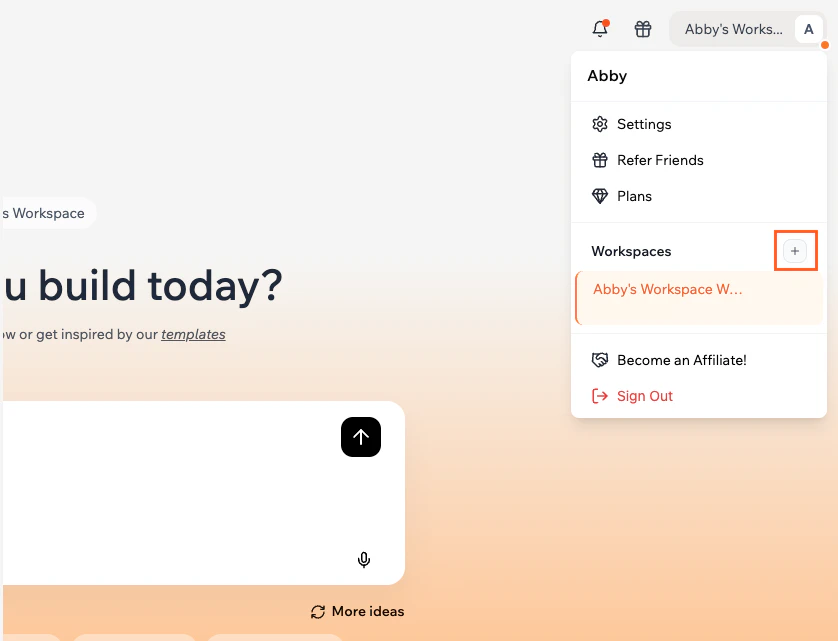
These workspaces use the plan and credits chosen by the owner for that specific workspace. When you build or edit apps in a workspace you were invited to, any activity that uses credits is taken from that workspace’s shared credit pool, not yours. To create a new workspace:
- Click your profile icon at the top right of your account.
- Click the Create a workspace icon next to Workspaces.
- Enter a name for your workspace.
- Click Create Workspace.
Workspace members
Invite members to your workspaces so you can build and manage apps together. Roles control what each person can see and do.Inviting members
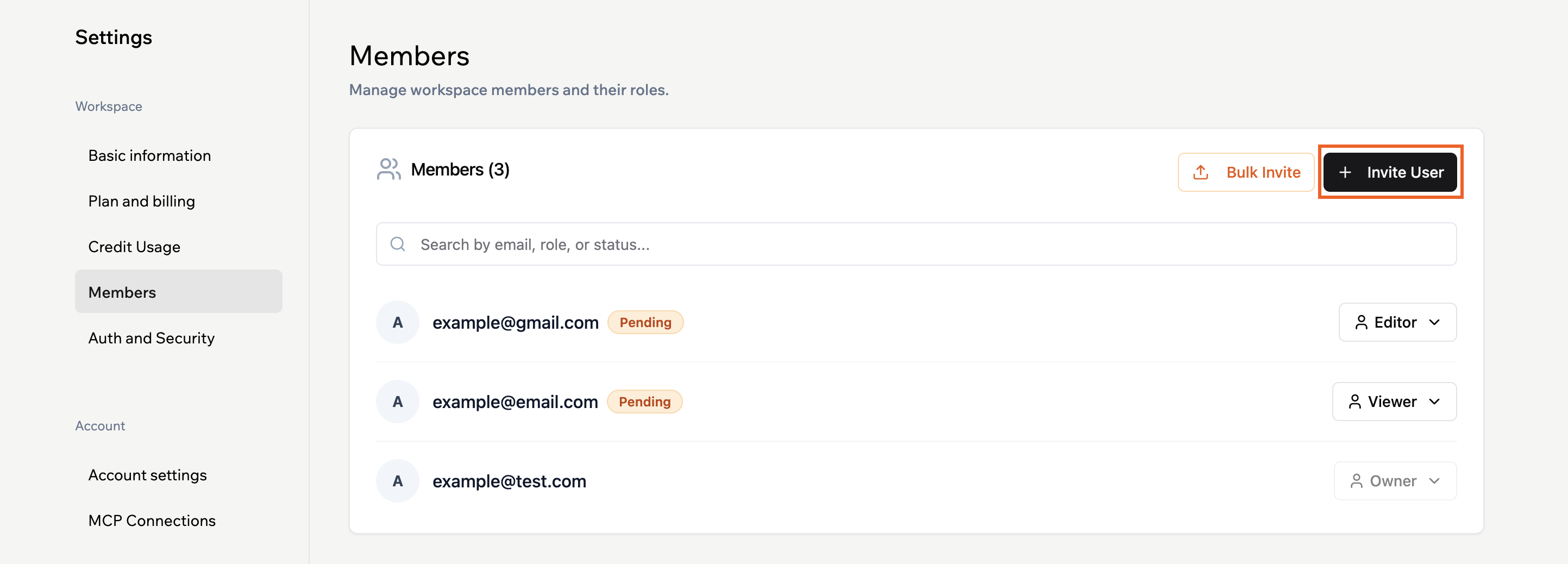
You can invite as many members as you want to a workspace. This applies on every plan, including Free. When you invite someone, you choose the role that matches what you want them to do in that workspace. Members you invite do not need their own paid plan. They use the plan and credits of the workspace they join when they build or edit apps there. To invite a member:- Click your profile icon at the top-right of your workspace.
- Click Settings.
- Click Members.
- Click Invite member.
Assigning roles
Available roles depend on your plan.- Free and Builder: Workspaces have 3 roles: Owner, Editor, and Viewer.
- Business and Enterprise: Workspaces have 4 roles: Owner, Admin, Editor, and Viewer.
| Role | Available on plans | What they can do | Billing access | Workspace access |
|---|---|---|---|---|
| Owner | All plans | Owns the workspace, manages billing, people, settings, apps, and credits | Yes | Full access to the entire workspace |
| Admin | Business, Enterprise | Can do everything an Editor can and manage members and workspace settings | No | Full workspace access except for billing and plan purchase or upgrade |
| Editor | All plans | Can create new apps and edit existing ones they have access to | No | Access to apps they can view or edit. No access to workspace billing or members |
| Viewer | All plans | Can view specific apps they are invited to. Cannot create or edit apps | No | Only the specific apps they are invited to. No access to the rest of the workspace |
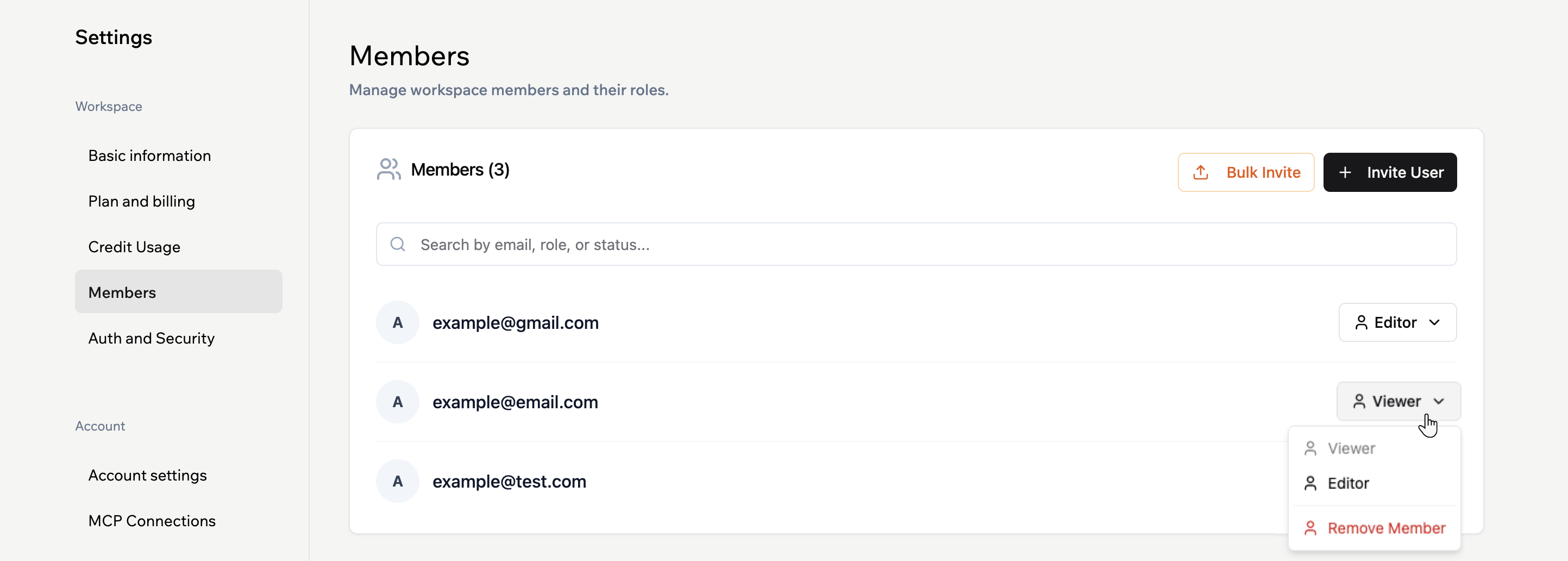
- Click your profile icon at the top-right of your workspace.
- Click Settings.
- Click Members.
- Click the member’s role and update as needed.
Apps and ownership
Apps live inside workspaces and always use the plan and credits of the workspace owner.- When you create an app, it is attached to the workspace you are working in at that time.
- You cannot move apps between workspaces. If an app needs a different group of members or billing, choose the relevant workspace before you start building.
- Members with the right role can then work on and manage that app alongside you.
FAQs
Click a question below to learn more about how the new model works.How do plans and credits relate to each other?
How do plans and credits relate to each other?
Your workspace’s plan defines its features and controls. Its credit level defines how much usage it has each month.You choose a plan that matches how you work in that workspace, then pick a credit level that fits how much activity you expect. When you need more usage, you increase the workspace’s credit level instead of changing plan tier.
Do members need their own paid plan?
Do members need their own paid plan?
No. Members use the plan and credits of the workspace owner for each workspace they join.You can invite an unlimited number of members without buying separate plans or seats. When they build or edit apps in a workspace, their activity uses credits from that workspace’s shared pool.
Do backend functions cost credits in the new model?
Do backend functions cost credits in the new model?
Yes. Backend functions are available on the Builder plan and higher, and they are part of the usage model.When a backend function runs and calls an integration, that call uses integration credits. For example, a backend function that sends a request to a large language model or another Base44 integration consumes one integration credit from that workspace’s shared pool.
Can I change my credit level later?
Can I change my credit level later?
Yes. You can adjust a workspace’s credit level from your account billing settings.You can move up if apps in that workspace are growing and you need more usage, or move down if you are using fewer credits, while keeping the same plan tier and feature set.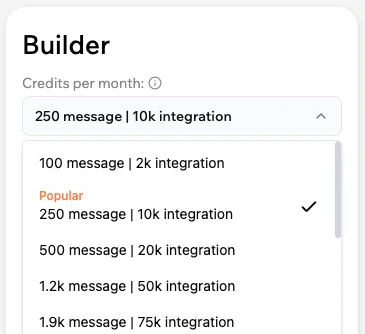
Can I move apps between workspaces?
Can I move apps between workspaces?
Not at the moment. Apps stay in the workspace where they were created.If you need different members to work on an app, you can invite them to the workspace where the app lives and adjust their roles as needed.
Do I own the applications I create on Base44?
Do I own the applications I create on Base44?
Yes. All applications and content you generate through Base44 belong to you. Base44 does not claim ownership of anything you create. You can use, modify, distribute, or sell the applications and content you build in any way that suits you.
Can I create private apps on the Free plan?
Can I create private apps on the Free plan?
No. On the Free plan, you can only build public apps. If you want to create private apps that are only visible to the collaborators you choose, you need to upgrade that workspace to a paid plan.