

SEO elements that affect search visibility
- Base44’s SEO setup is designed and supported for apps that are published on a custom domain. Free Base44 URLs can still be crawled by search engines, but they are not intended for long-term, production SEO.
- Base44 has a built-in tool that scores your app and surfaces fixes directly in your dashboard. Check your app’s SEO and GEO score.
How your app’s SEO and GEO works
Base44 sets up and maintains the main technical elements that search engines and AI platforms expect. This covers how your pages are discovered, how they are crawled, and how your app is represented across the web and in AI-generated answers. These technical signals support both search engine optimization (SEO) and generative engine optimization (GEO). You do not need to upload or manage any of these files yourself. Your job is to publish on a custom domain and provide clear, trustworthy content.- Meta titles: Each page has a unique meta title based on its URL (for pages without URL parameters). This helps search engines distinguish between pages and show clear titles in results.
- Heading structure and semantic HTML: Base44 serves crawlers a rendered version of your pages, with your real headings, content, and semantic structure, so they can understand them without running your app. If a page has not been rendered yet, Base44 falls back to a short summary carrying that page’s heading, its description, and links to your other pages, so crawlers still receive something meaningful rather than an empty shell. AI crawlers read whatever version is ready at the time, so a page they reach first may give them the summary.
- Canonical tags: Base44 adds self-referencing canonical tags to every page. For URLs that include query parameters, Base44 intelligently filters out tracking parameters (such as
utm_*andfbclid) while preserving content-affecting parameters (such as?id=123). Parameters are also sorted consistently so that the same page always produces the same canonical URL regardless of parameter order. - Sitemap (sitemap.xml): Base44 automatically generates and serves a sitemap at
/sitemap.xml. Public, indexable pages are included, while private or internal pages are excluded. You can submit this sitemap directly in Google Search Console and other webmaster tools. - robots.txt: Base44 creates and serves a
robots.txtfile for both free and paid apps. It allows search engines and AI crawlers to access your public content while protecting non-public or technical routes from indexing. - AI crawler access (llms.txt): You can enable
llms.txtgeneration from the SEO & GEO page in your dashboard. When enabled, Base44 generates a lightweight file that gives AI crawlers like GPTBot, ChatGPT-User, ClaudeBot, and PerplexityBot a clear, structured summary of what your app does. This supports GEO by helping AI-powered search tools understand and recommend your app. It is off by default. - Clean URLs and routing: Your app uses clean, readable URLs rather than duplicate or unnecessary paths. This supports better crawl behavior and improves clarity for visitors.
- Internal linking: Navigation and internal links use proper anchor tags and clean URLs so search engines can follow and understand your app structure.
- Social sharing tags and previews (Open Graph and Twitter): Base44 sets social metadata so links to your app show a sensible title, description, and image when shared on social platforms. Social card images are automatically resized to 1200 × 630 and include the correct URL metadata, which reduces Open Graph and card size warnings and helps previews display consistently across major platforms such as Facebook, X (Twitter), LinkedIn, and WhatsApp. These previews use the title, description, and logo you configure in your app’s settings.
- Mobile-friendly layout: Apps generated with Base44 are responsive and adapt to different screen sizes. This supports mobile-first indexing and improves your visitors’ experience on phones and tablets.
- Image optimization and performance: Images and assets are served in optimized ways where possible, and the hosting environment is tuned for good performance. Strong performance helps with Core Web Vitals and overall search quality signals.
- Other site metadata: Base44 manages technical files such as the web app manifest and favicon for custom domains. These help browsers and devices display your app correctly in tabs, shortcuts, and installable views. They matter beyond the browser too: When an AI assistant lists recommended businesses, your site name and favicon are often the only brand assets someone sees.
index.html file for your app. This lets you add trusted <meta> tags and <script> tags that need to appear directly in the HTML source, such as analytics, advertising, verification, or other third-party scripts.
What Base44 does not generate automatically:
There are some SEO and GEO elements that Base44 does not create by default.
- Per-page meta descriptions: Base44 does not set a custom meta description for each page by default. You can set these manually from the SEO & GEO page in your dashboard, or search engines generate their own snippets from the visible content on your page.
- Custom structured data for rich results: BreadcrumbList structured data is automatically synthesized for every page. WebSite, Organization, and FAQPage schemas are injected once generated, which you can do from the SEO & GEO scan using Fix with AI. For additional schema types such as
Article,Product,LocalBusiness, orEvent, you can ask the AI to add JSON-LD structured data into your app or add it in code, then validate the markup using tools such as Google’s Rich Results Test and the schema.org validator.
Refreshing what crawlers see
Search engines, social apps, and AI tools read your pages without running your app, so Base44 prepares a ready-made copy of each page for them. This is called prerendering. Base44 opens your page, waits for it to load, and saves the finished result that crawlers receive. When Google, a link preview, or an AI tool shows old or empty content, it’s usually reading an older saved copy.Understanding automatic refreshes
Base44 keeps saved copies up to date for you. There’s nothing to turn on, and it works for public apps with SEO turned on.- When you publish: Base44 marks every saved copy as out of date. The next crawler to visit a page can still get the previous copy while Base44 makes a new one, and visits after that get the updated page.
- When your data changes: Adding or editing records in your app’s data also queues your pages for a refresh, so pages built from that data catch up.
- When a crawler finds a new page: If a page has no saved copy yet, the crawler gets a short summary of the page and Base44 makes a full copy for the next visit.
Fixing outdated crawler pages
If a page still shows old or empty content after you publish, find the case that matches what you see:Ask Google to check a page again
Ask Google to check a page again
- Open Google Search Console and select your site.
- Click URL inspection and enter the page’s full URL.
- Click Request indexing if it’s available.
Point your custom domain straight at Base44
Point your custom domain straight at Base44
Make data-driven pages public
Make data-driven pages public
- Still shows old content after crawlers have visited it since your last publish.
- Shows a loading spinner or a “not found” message instead of your content.
- Shows the same general summary on every page of one type, like every product page.
Strengthening trust and authority
Search engines and AI systems both look for signs that your app represents a real, trustworthy organization. Trust signals like business details, named team members, and policy pages help search engines confirm you are legitimate, and help AI platforms decide whether to recommend you.Add clear business details
Add clear business details
Introduce the people behind the content
Introduce the people behind the content
Include legal and policy pages
Include legal and policy pages
Creating content for search and AI discoverability
On top of a strong technical foundation, your content should match the language and questions your audience actually uses. The same content principles that help you rank in search results also make your app more likely to be cited or recommended in AI-generated answers.Use your audience's language
Use your audience's language
- Asking non-experts how they would describe what you do.
- Looking at Google’s autocomplete suggestions when you type your main topic.
- Checking “Related searches” and “People also ask” sections for your main query.
Turn common questions into FAQ content
Turn common questions into FAQ content
Improve headings and internal links
Improve headings and internal links
Add specific numbers and data to your content
Add specific numbers and data to your content
Adding structured data for rich results
Structured data (schema.org) is a way to describe your content in a machine-readable format. When implemented correctly, it can enable rich results, such as FAQ drop-downs or star ratings, in search results. Base44 automatically synthesizes BreadcrumbList structured data for every page. You can generate WebSite, Organization, and FAQPage schemas from the SEO & GEO scan using Fix with AI, after which the platform injects them automatically. For additional schema types such asArticle, Product, or LocalBusiness, you can ask the AI to inject JSON-LD code into the appropriate parts of your app.
Well-structured content and valid schema also help AI assistants understand what your app does when they generate answers that include links or references to external sites. This is an important part of generative engine optimization (GEO).
Organization or brand schema
Organization or brand schema
FAQ schema
FAQ schema
Local business schema (optional)
Local business schema (optional)
Connecting Google Search Console
Google Search Console (GSC) is a free tool from Google that shows how your app appears in search results. It lets you:- Confirm that Google can access and index your app.
- See which queries bring visitors to your pages.
- Monitor indexing coverage and resolve technical issues.
SEO and GEO best practices checklist
Use the checklist below to make sure you are getting the most from Base44’s SEO and GEO foundation.SEO and GEO checklist for your app
FAQPage schema when appropriate. Use descriptive internal links: Link between related pages using meaningful anchor text so search engines understand how your content is connected. Connect search console tools: Verify your app in Google Search Console and, if relevant, Bing Webmaster Tools. Submit your sitemap so you can monitor indexing, search queries, and technical issues, and understand how your app appears in search results and AI-generated answers.FAQs
Click a question below to learn more about your app’s SEO and GEO.Why doesn't my app show up in search yet?
Why doesn't my app show up in search yet?
- Published on a custom domain
- Public and accessible (not restricted behind authentication)
- Connected to your correct URL in Google Search Console (optional but recommended) or similar tools such as Bing Webmaster Tools.
Can Base44 guarantee good rankings in search or AI answers?
Can Base44 guarantee good rankings in search or AI answers?
How do I make my app appear in search results?
How do I make my app appear in search results?
What happens if I turn off SEO for my app?
What happens if I turn off SEO for my app?
robots.txt allows access.Turn it off when you want your app kept out of search altogether. If you only want to stop Base44 overwriting your own meta tags, leave it on and use the granular controls instead.Do I need to submit my sitemap or manage SEO files manually?
Do I need to submit my sitemap or manage SEO files manually?
/sitemap.xml and manages robots.txt, llms.txt, and other core files for you on custom domains. You do not need to upload these files yourself. Submitting your sitemap directly in Google Search Console or other webmaster tools is still recommended so search engines can process your URLs more efficiently.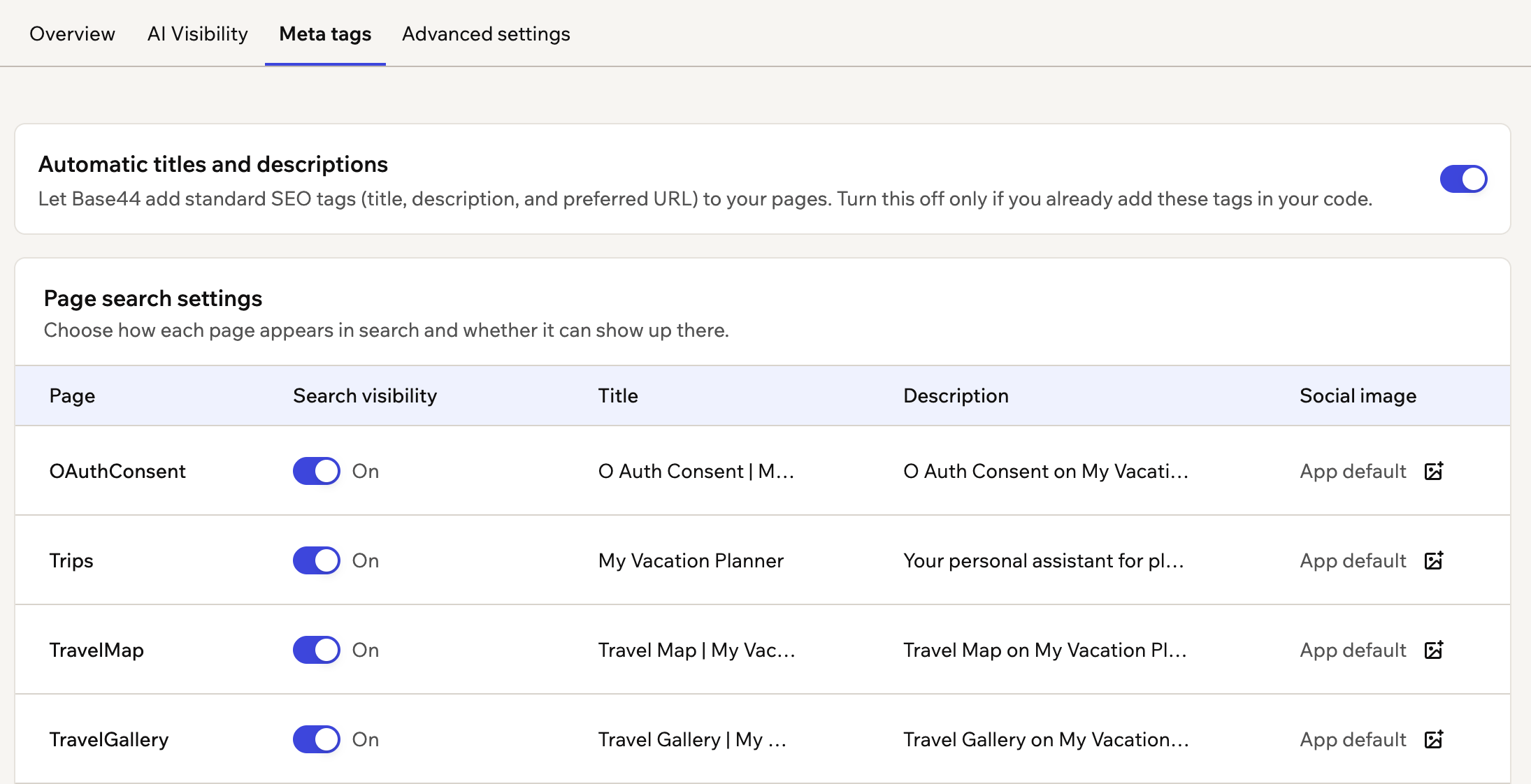
Can I use structured data to get rich results (FAQ, local, stars)?
Can I use structured data to get rich results (FAQ, local, stars)?
LocalBusiness or Article, you can add JSON-LD using prompts or code. Always validate your structured data with Google’s Rich Results Test, and remember that rich results are never guaranteed, even when your schema is valid.How do I add or edit a manifest.json for my app?
How do I add or edit a manifest.json for my app?
manifest.json file for you automatically on custom domains. There is no need to manually upload or edit this file. Your app’s metadata is updated by the system in the background.Can I customize or replace the auto-generated sitemap.xml with my own?
Can I customize or replace the auto-generated sitemap.xml with my own?
/sitemap.xml immediately, with no custom sitemap needed.Replacing the auto-generated sitemap with your ownTo use a fully custom sitemap at /sitemap.xml:- On the Advanced settings tab of the SEO & GEO page, under Search engine files, turn off Sitemap.
- Deploy your own sitemap file as
public/sitemap.xmlin your app’s code. Base44 serves this file at/sitemap.xmlautomatically.
public/sitemap.xml is deployed, /sitemap.xml returns a 404.Serving a dynamic sitemap from a backend functionIf your app uses dynamic routing or you need full control over your sitemap contents, you can serve the sitemap from a backend function and submit its URL in Google Search Console. Google accepts sitemaps from any path on your verified property when you submit them through Search Console, not only root-level paths like /sitemap.xml.To submit a sitemap served from a backend function:- Create a backend function that returns valid sitemap XML with the
application/xmlcontent type. - Make sure the function does not require authentication, so search engine crawlers can fetch it.
- In Google Search Console, go to Sitemaps and submit the full function URL, for example
https://www.yourdomain.com/functions/serveSitemapXml.
How do I set the language of my app for browsers and search engines?
How do I set the language of my app for browsers and search engines?
lang attribute that tells browsers and search engines what language the page is written in. Setting this correctly helps tools detect your language, improves accessibility, and can reduce incorrect auto-translation prompts.To change the language declaration, edit the <html> tag in your app’s index.html file in the Code tab and update the lang value, for example from lang="en" to lang="fr" or lang="es".Use standard language codes (such as en, fr, de, or pt-BR) and only set a language code that matches the main content of the app.What's the best prompt to improve my app's SEO and GEO?
What's the best prompt to improve my app's SEO and GEO?