

Before you begin
Setting up Base44 Payments is quick, and you can start selling straight away. All you have to do is:- Connect Base44 Payments using the AI chat in your app editor.
- Publish your app and go live.
- Start accepting payments from customers immediately.
- Complete setup and verification to start receiving payouts.
Important information
Check these details before you set up Base44 Payments:- You can use Base44 Payments for one-time payments or recurring subscriptions.
- You need a Builder plan or higher.
- Your app must be published and accessible during verification.
- You must have a business and bank account based in one of the supported countries listed below.
- Base44 Payments powered by Wix is available to eligible customers in these countries and currencies:
- United States: USD
- United Kingdom: GBP
- Germany: EUR
- Netherlands: EUR
- Spain: EUR
- Switzerland: CHF
- Belgium: EUR
- Portugal: EUR
- Finland: EUR
- Lithuania: EUR
- Austria: EUR
- Italy: EUR
Prohibited products and services
To keep payments safe and compliant, some products and services cannot be sold via Base44 Payments powered by Wix. Examples include:- Illegal products or services
- Certain financial services, investment schemes or high-risk lending
- Some adult content or services
- Weapons, some types of ammunition and related accessories
- Certain gambling or betting services
- Products that encourage hate or violence
Connecting Base44 Payments
Once Base44 Payments is connected to your app, securely accept payments from customers using:- Major credit and debit cards
- Apple Pay
- Google Pay
- PayPal (United States only)
- Buy now, pay later services: Affirm, Klarna, and Afterpay/Clearpay
- Local payment methods: iDEAL, Bancontact, and Twint
- Go to your app editor.
- Prompt the AI chat to connect to a payment method. For example:
Enable online payments.If you are eligible, you’re prompted to connect Base44 Payments. - Click Connect to accept Base44 Payments terms of use and service fees.
- Click Dashboard.
- Click Overview.
- Click Manage next to Payments to open the Payments dashboard.
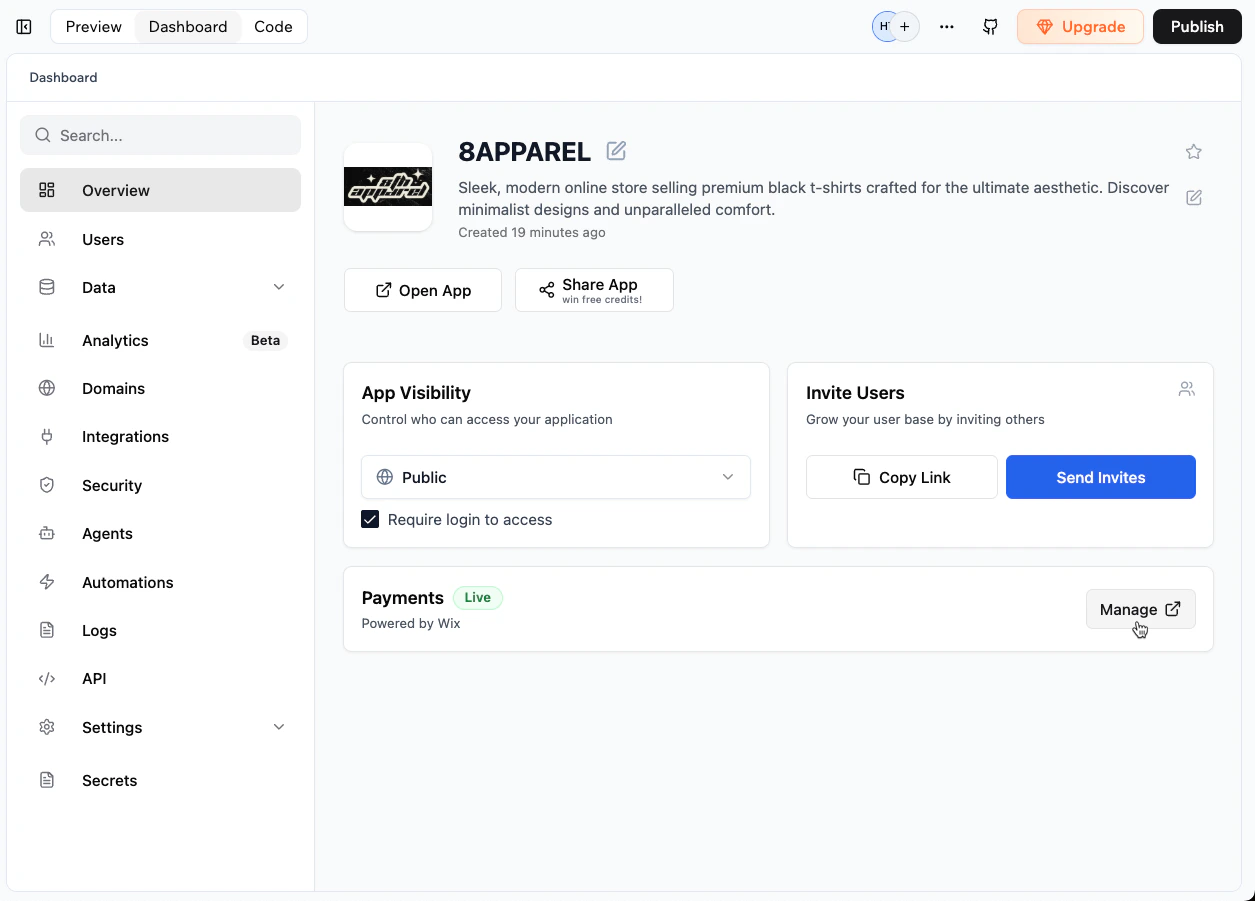
Opening the Payments dashboard from your app dashboard
Alternative payment methods
In addition to cards and digital wallets, Base44 Payments powered by Wix supports buy now, pay later services and local payment methods. The methods available to your customers depend on the country where your business is based.Accepting a method
Alternative payment methods are not switched on for you. On the Accept Payments page in your Payments dashboard, each one shows an Accept button, and you accept the methods you want to offer. Each also links to its own qualification and terms. See Managing payment methods.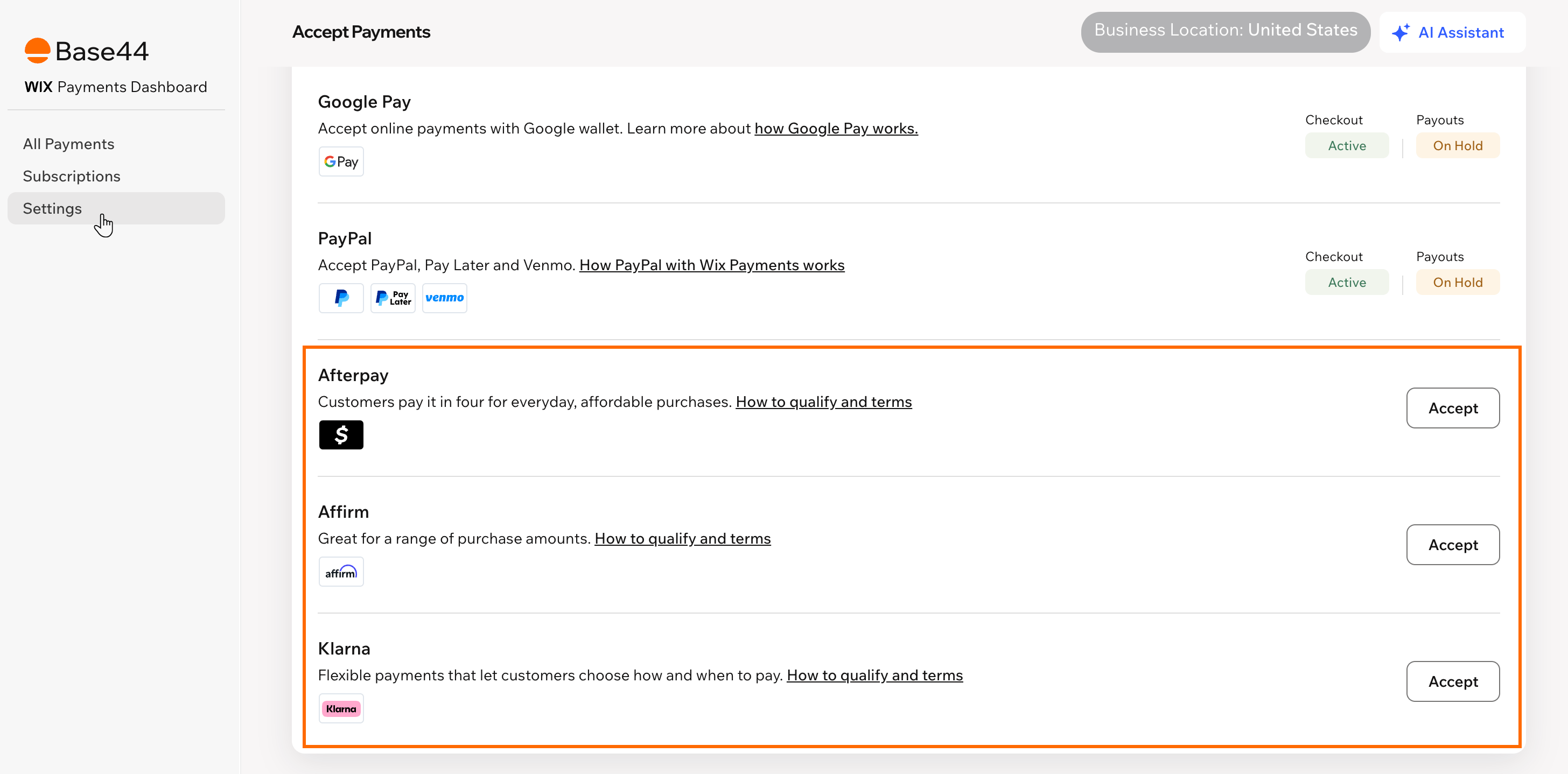
Accepting alternative payment methods in your Payments dashboard
Qualification and terms
Affirm, Klarna, and Afterpay/Clearpay each set their own qualification criteria, prohibited products, and terms of use, in addition to the prohibited products and services policy. By accepting payments with one of these services, you agree to that provider’s terms. Review the qualification requirements, supported currencies, and service fees for each service before you start selling:- Affirm qualification and terms of use
- Klarna qualification and terms of use
- Afterpay/Clearpay qualification and terms of use
Completing the setup
Complete your Base44 Payments account setup and verification before receiving payouts. Details include:- Your business type and legal name.
- Your business address in one of the supported countries.
- The main contact person’s details.
- The bank account where you want to receive payouts.
Getting ready to sell
Before accepting payments with Base44 Payments powered by Wix, make sure your app includes clear business information and policies, and that customers get back to your app after paying. This builds customer trust and helps ensure your Base44 Payments account passes verification without delays.Business contact details
Add your business name and easy-to-find contact details so customers can reach you if needed. Best practices include:- Display your business name clearly, using your legal name or “Doing Business As” name exactly as provided during Base44 Payments setup.
- Add your physical business address, including the country. Post office boxes and mail-forwarding addresses are not considered valid.
- Provide customer service contact details such as an email address and phone number.
Required business policies
Your app should include relevant policies to inform and protect customers, such as:- Terms and conditions.
- Privacy policy.
- Refund, return, or cancellation policy.
- Shipping, fulfillment, or delivery policy.
Product and pricing details
Provide clear and transparent details about what you sell, including:- Detailed product or service descriptions.
- Clear pricing and purchase currency.
- Transparent terms for subscriptions or recurring payments, including billing intervals and cancellation options.
Checking the return page
After customers pay, checkout sends them back to a Thank You page in your app. When you connect Base44 Payments, Base44 adds this page for you. If the page is missing from your app, or from your published app, customers land on “Page not found” after paying. The Payments tab warns you when this would happen. In test mode, it checks your app in the app editor, and in live mode, your published app. The warning also appears when you switch to live mode, but it doesn’t stop you from going live. To fix the return page:- Click Dashboard in your app editor.
- Click Payments.
- In the warning, do one of the following:
Add the page
Add the page
Publish your app
Publish your app
Best practices
Following best practices helps you build trust with customers, reduce disputes and chargebacks, and keep your Base44 Payments account in good standing.Contact information
Contact information
- Display your legal business name or Doing-Business-As name.
- Include a physical address or mailing address.
- Provide multiple contact methods such as email, phone number, contact form, or social channels.
- Reply to customers in a timely manner.
- Keep records of all customer communication, especially for disputes.
Clear pricing
Clear pricing
- Show full prices including currency.
- Clearly display shipping, handling or additional fees before checkout.
- Ensure prices are readable across devices and screen sizes.
Refund and return policies
Refund and return policies
- Make the policy concise and easy to understand.
- Display it wherever customers confirm their purchase.
- Ensure it complies with applicable laws.
- Keep it accessible in a central Policies or Help section.
Shipping and delivery information
Shipping and delivery information
- Display shipping costs clearly.
- Specify delivery methods and timelines.
- Provide tracking information if available.
- Clarify return shipping responsibilities.
- Explain how delivery works after payment.
- Clarify download access and traceability.
- Describe available support or refund options.
Privacy policy and terms
Privacy policy and terms
- What data you collect.
- How you use and store it.
- How long you retain data.
- How customers can request access or deletion.
Disputes and chargebacks
Disputes and chargebacks
- Respond to customers promptly.
- Consider refunding early to prevent escalation.
- Keep delivery confirmations and communication records.
- Minimize chargebacks to protect your merchant standing.
Managing payments and payouts
Manage payments, payouts, refunds, and reports from your Payments dashboard, with full visibility into your cash flow. You can also track your app’s revenue, transactions, and subscriptions from your app dashboard. See Tracking payments in your app.Viewing payments
From the Payments dashboard:- View each transaction, including its amount, date, payment method, and status.
- Filter by date range, status, or payment method.
- Search for a specific payment using the customer name, order ID, or transaction ID.
- Click Dashboard in your app editor.
- Click Overview.
- Click Manage next to Payments.
- Click All Payments.
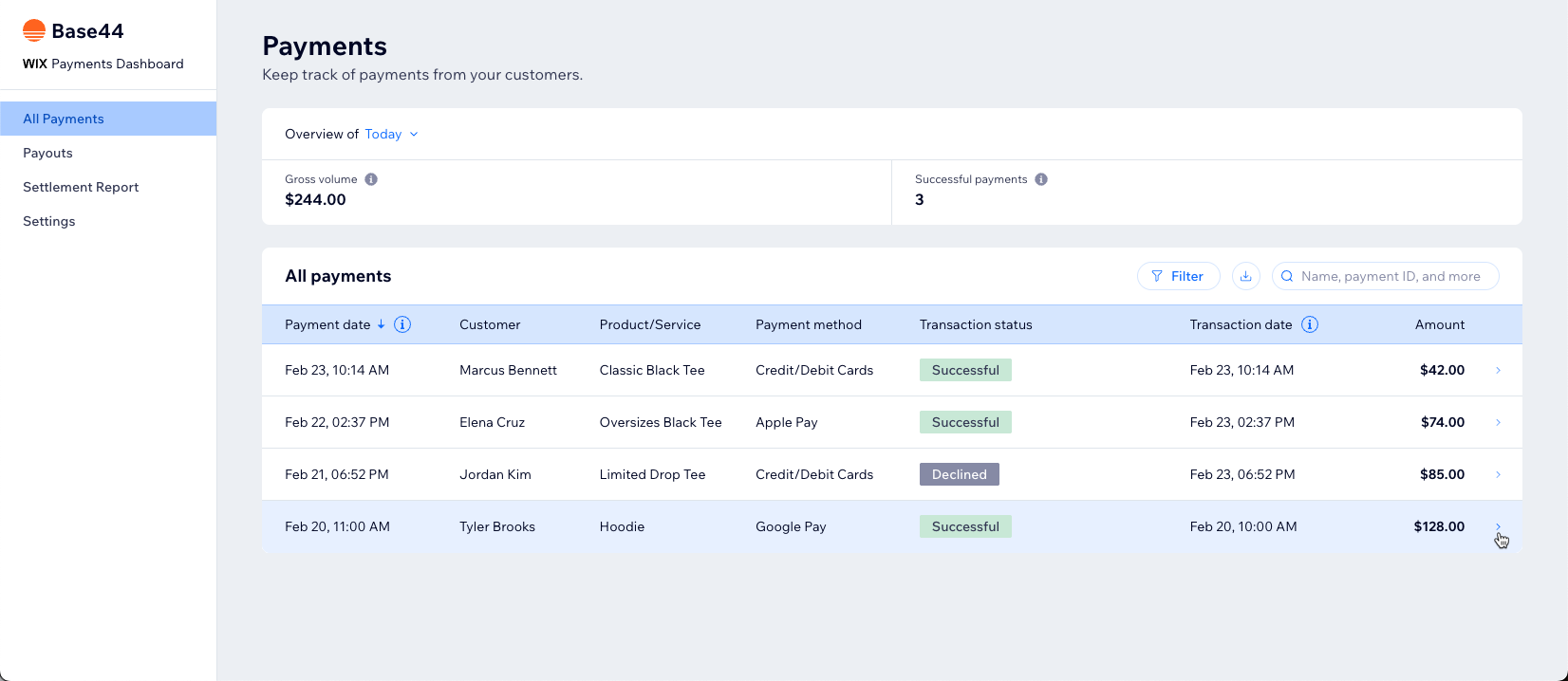
Payments dashboard showing payment history and transaction details
Understanding payouts
Base44 Payments powered by Wix groups your successful customer payments into payouts that are deposited into your bank account.- Payment processing: There is a standard delay between when a customer pays and when the funds are deposited into your bank account. This gives time for processing, refunds and disputes. Processing typically takes 2 to 5 business days.
- Payout schedule: You can usually choose how often you get paid. This can be daily, weekly or monthly, as preferred.
- Payout destination: Payouts go to the bank account you add during setup. You can change this account later, if needed.
- Failed payouts: If a payout fails, your Payments dashboard shows a message explaining what went wrong, for example incorrect bank details.
- Payout details: The Payouts tab lists payouts on hold, your scheduled payout with its estimated arrival date, and sent payouts. Click a payout to see its fees and every transaction in it, and click Download detailed table to save it as a CSV file.
- Click Dashboard in your app editor.
- Click Overview.
- Click Manage next to Payments.
- Click Payouts.
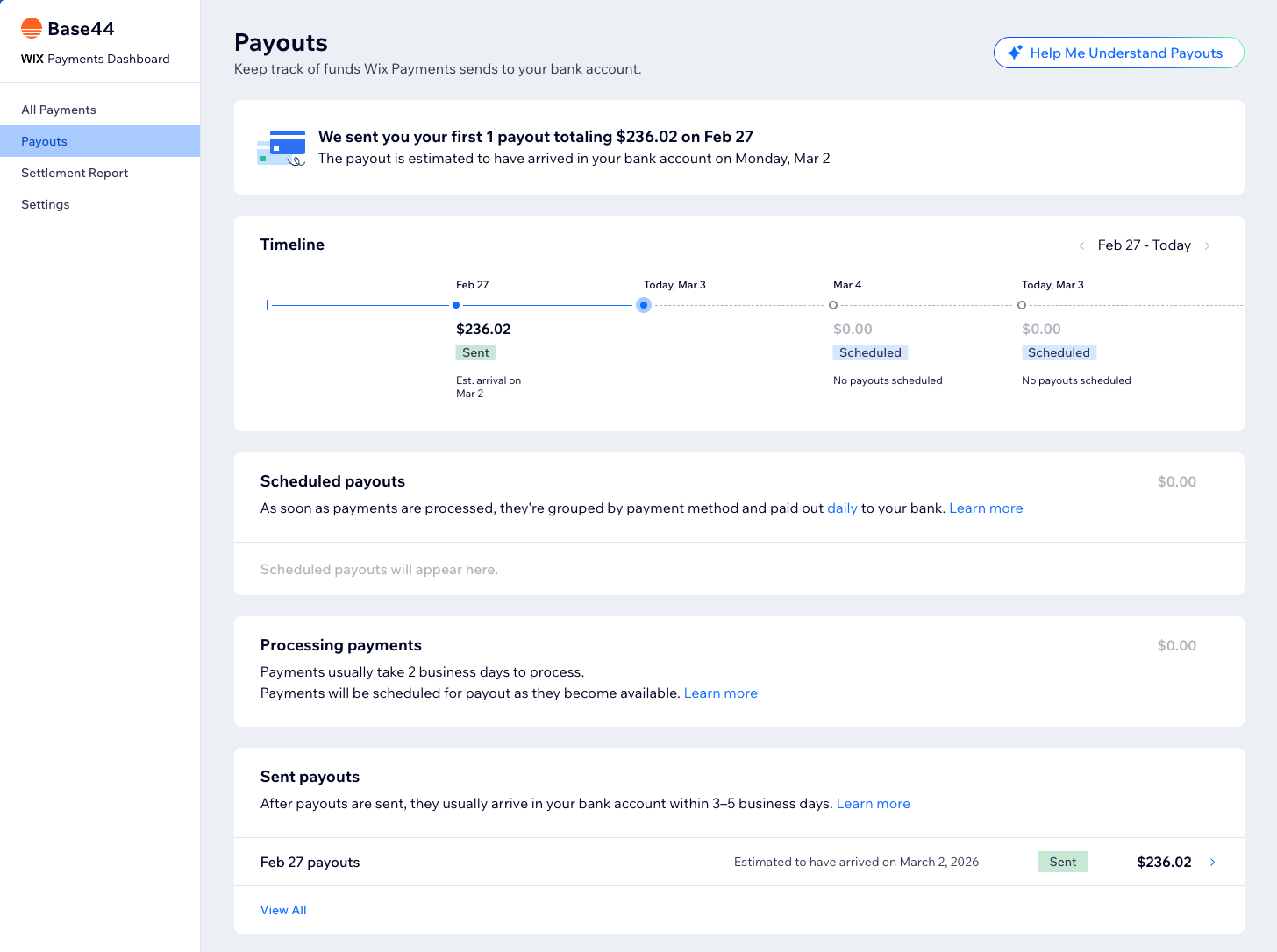
Tracking payout status in the Payments dashboard
Issuing refunds
You can refund your customers directly from your Payments dashboard. When you issue a refund:- The refunded amount is taken from your Base44 Payments balance.
- If your balance does not cover the full refund, the remaining amount may be taken from upcoming payments or from your next payout.
- Refunds may take several business days to reach your customer, depending on their bank or payment method.
- Refunds reduce your available balance and may affect the size and timing of your next payouts.
- Click Dashboard in your app editor.
- Click Overview.
- Click Manage next to Payments.
- Click All Payments.
- Click the payment you want to refund.
- Click Refund.
- Enter the amount and a note (if needed), then click Refund.
Handling a negative balance
Your Base44 Payments balance can become negative if you issue refunds or incur chargebacks that amount to more than your available funds. If your balance is negative:- New successful payments go toward covering the negative amount.
- Payouts are paused until your balance returns to a positive amount.
- You do not have enough funds to cover any additional refunds or chargebacks that may occur.
- You can return to a positive balance by adding funds to your account using a credit or debit card.
- Click Dashboard in your app editor.
- Click Overview.
- Click Manage next to Payments.
- Click Payouts.
- Click Add Funds.
- Enter your payment details.
- Click Add Funds.
Managing payment methods
From the Payments dashboard, you can choose which payment methods you offer your customers. Cards and wallets show their current checkout and payout status. Alternative payment methods show an Accept button instead, which you click to start offering that method. The page shows your Business Location, which is what decides the methods available to you. To manage payment methods:- Click Dashboard in your app editor.
- Click Overview.
- Click Manage next to Payments.
- Click Settings to see your payment methods.
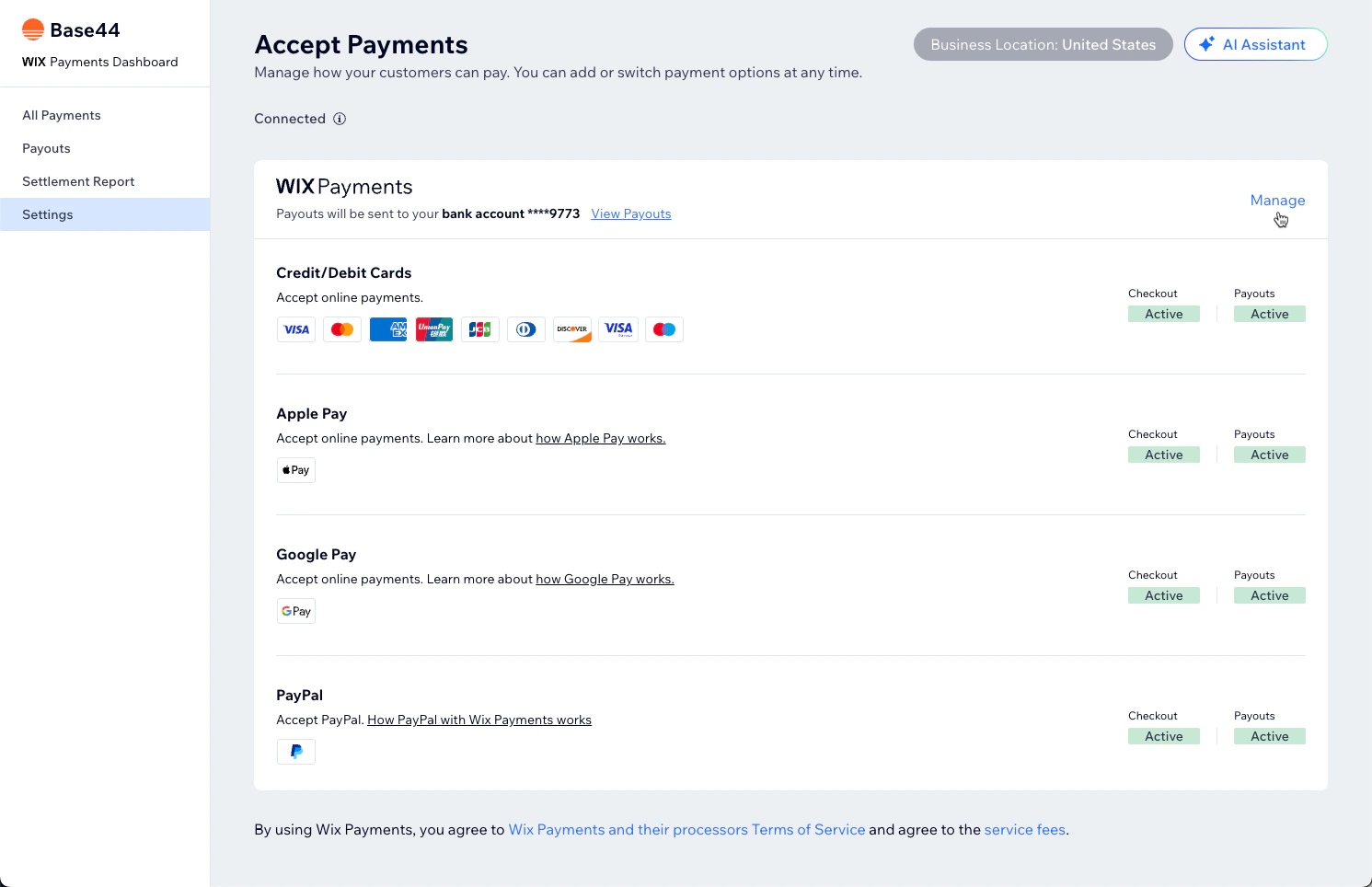
Managing payment methods in the Payments dashboard
Viewing subscriptions
If your app sells recurring subscriptions, the Subscriptions page lists them and shows your total and active subscription counts. You can filter the list and search for a customer. To view your subscriptions:- Click Dashboard in your app editor.
- Click Overview.
- Click Manage next to Payments.
- Click Subscriptions.
Setting a grace period
A grace period keeps a subscription active for a while after a payment fails, so you have a chance to recover the customer instead of losing them. Grace periods stay off until you turn them on. You choose how long the period lasts, anywhere from 1 to 14 days, and whether the customer’s payment method is retried automatically during that time. To set a grace period:- Click Dashboard in your app editor.
- Click Overview.
- Click Manage next to Payments.
- Click Subscriptions.
- Click Subscription Settings.
- Turn on Grace period.
- Under General settings, enter the number of days.
- (Optional) Turn on Retry a customer’s payment method automatically during grace period.
Accessing settlement reports
Settlement reports give you a detailed, exportable list of all transactions processed through Base44 Payments powered by Wix.- See each transaction, its status and the related payout.
- View the Base44 Payments service fee for each transaction.
- Download a CSV file of the full report for accounting or tax purposes.
- Filter by date range or transaction type before you download.
- Click Dashboard in your app editor.
- Click Overview.
- Click Manage next to Payments.
- Click Settlement Report.
- (Optional) Filter the report, or click Download Detailed Table.
Using another provider
You can take payments in your app with any provider that offers an API. Base44 Payments and Stripe are built in. For any other provider, such as PayPal, Paystack, Mercado Pago or Razorpay, the AI chat connects it to your app through the provider’s API. This is useful if Base44 Payments isn’t available where your business is based, or if you’d rather use a provider you already work with. If your business is in the United States, Base44 Payments already includes PayPal, so you don’t need a separate PayPal setup. Choose the option that fits your business.Set up Stripe
Set up Stripe
Connect a provider with its API
Connect a provider with its API
- Go to your app editor.
- Describe the provider and the payment flow you want in the AI chat. For example:
- Paste your API keys when the AI chat asks for them, or add them yourself as app secrets.
- Copy the webhook URL the AI chat gives you and add it in your provider’s dashboard.
Troubleshooting
If Base44 Payments powered by Wix cannot verify your app, payments and payouts may be delayed. Review the topics below for common verification issues and solutions.Common verification issues
Common verification issues
- Your app is not published: Click Publish in the app editor and publish your app.
- Your app was deleted: Restore or recreate the app so Base44 Payments powered by Wix can scan it.
- Your domain has expired: Renew your domain through Base44 or your domain provider.
- Your domain is still propagating: DNS changes may take up to 48 hours to complete.
- SSL issues: Fix any security certificate errors on your domain.
- Geographic restrictions: Remove any third-party apps or code blocking access from certain regions.
App accessibility in certain regions
App accessibility in certain regions
- Remove geographic restrictions from any third-party apps or custom code.
- Republish your app after applying the changes.
FAQs
Click a question below to learn more about using Base44 Payments powered by Wix with Base44.When do I receive my payouts?
When do I receive my payouts?
Can I change the bank account where I receive payouts?
Can I change the bank account where I receive payouts?
Does Base44 Payments support recurring subscriptions?
Does Base44 Payments support recurring subscriptions?
Can I accept donation payments with Base44 Payments powered by Wix?
Can I accept donation payments with Base44 Payments powered by Wix?
- Your cause must be registered as a charity.
- You may not accept donations on behalf of someone other than yourself. For example, you may not collect donations in the name of a well-known charity.
- A donation must be tied to a specific charitable purpose that you, or your team, are committing to accomplish and donations must be used for the charitable purpose described to the donor.